
Designing for Faster Broker Decisions
HIGHWAY
Project
Highway Directory Redesign (Industry sponsored)
Timeline
16 weeks
Team
8 members
Collaborations
UX Researchers, UX Designers, Product Managers, Compliance Team
My Role
Researcher & Product Designer
Overview
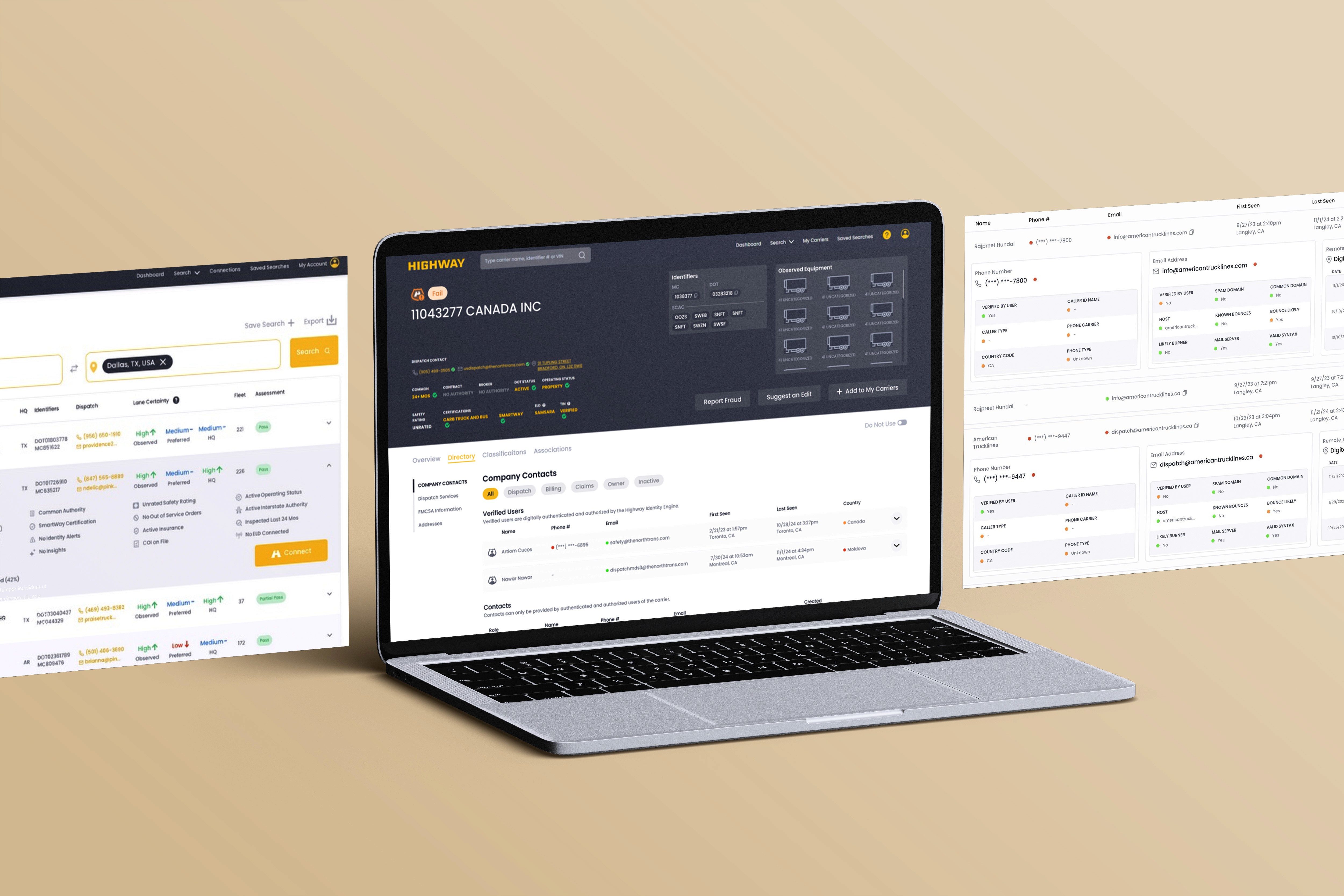
Highway is a fraud-prevention platform used by freight brokers to vet carriers before booking shipments. The Directory, a carrier profile page surfacing contacts, risk indicators, and compliance data, was the core of the product and the biggest source of friction.
The problem wasn't missing information. It was that everything carried equal visual weight, so nothing stood out when it needed to.
My focus: Restructure the directory around decision-making, not data display.
How We Researched

Contextual
Inquiries

Stakeholder
Interviews

Platform
Audit

Mental Model
Mapping
Two Users,
One Interface
3
Compliance Leaders needed depth. CSRs needed a decision in under 30 seconds. The directory treated them identically.
Same data order. Same visual weight. Different needs.
Design gap: no hierarchy for either workflow
The
Color System
Lost Trust
2
Green meant opposite things depending on context. Brokers had learned to second-guess their first read of every indicator.
A risk system that isn't trusted stops being useful.
Design gap: color without consistent meaning
Brokers
Built
Workarounds
1
CSRs used CMD+F to find contacts on the page. CLs manually cross-referenced timestamps between sections to infer contact credibility.
Workarounds show exactly where the design failed.
Design gap: no search, no trust signal
3 Patterns From Research
My focus sat at the intersection of research and design, understanding how brokers actually made decisions, then restructuring the interface around that. I worked on user research, information architecture, visual hierarchy, badge and indicator logic, and hi-fi execution.
Reducing cognitive friction in a dense enterprise environment by guiding attention intentionally, not by removing depth
My Contributions
Two completely different people used the same tool in opposite ways.
Understanding the Users
Two Users, One Tool
Compliance Leader - CL
The careful one
minutes per carrier
5–10
What they need:
All data points accessible and clearly organized
Ability to cross-reference sections quickly
Context for why a risk indicator is red or orange.
Pain point
No hierarchy to navigate efficiently, everything
required equal effort.
Carrier Sales Rep - CSR
The fast one
Scan for green signals, find a dispatcher, move on.
<30
seconds per carrier
What they need:
Most critical signals visible without scrolling
A dispatch contact they can trust immediately
A fast go/no-go read on the carrier.
Pain point
No hierarchy to navigate efficiently, everything
required equal effort.
The directory served neither. Same interface, same data ordering, for two completely different mental models.
Key insight: This wasn't a problem of too much data, it was data without rank.
What Was Broken
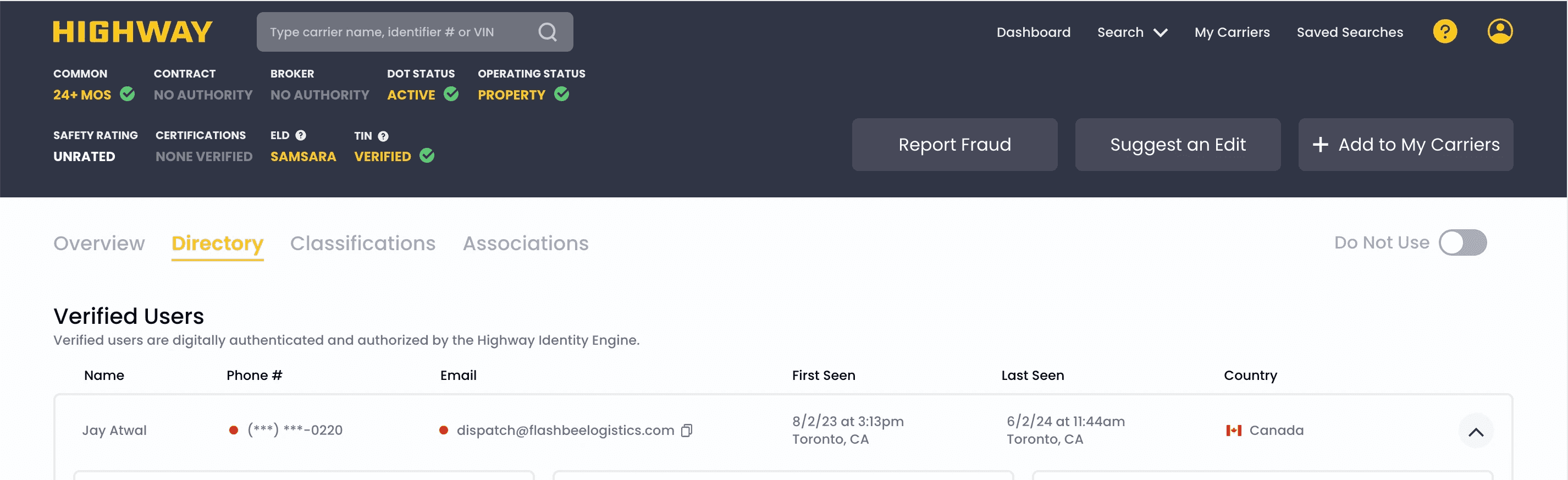
Fraud flags and DOT numbers carried the same
visual weight. Nothing told brokers where to
look first.
No Signal Hierarchy
1
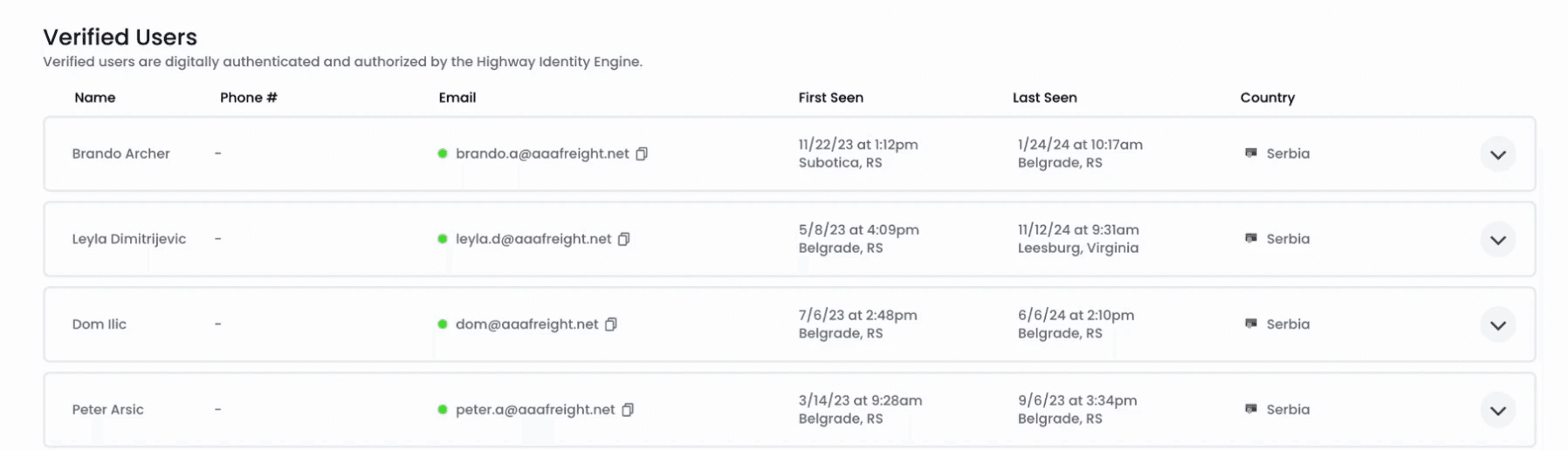
Verified Users and Contacts looked identical.
Brokers cross-referenced timestamps manually
to figure out who to trust.
Two Contact Sections, Invisible Difference
3
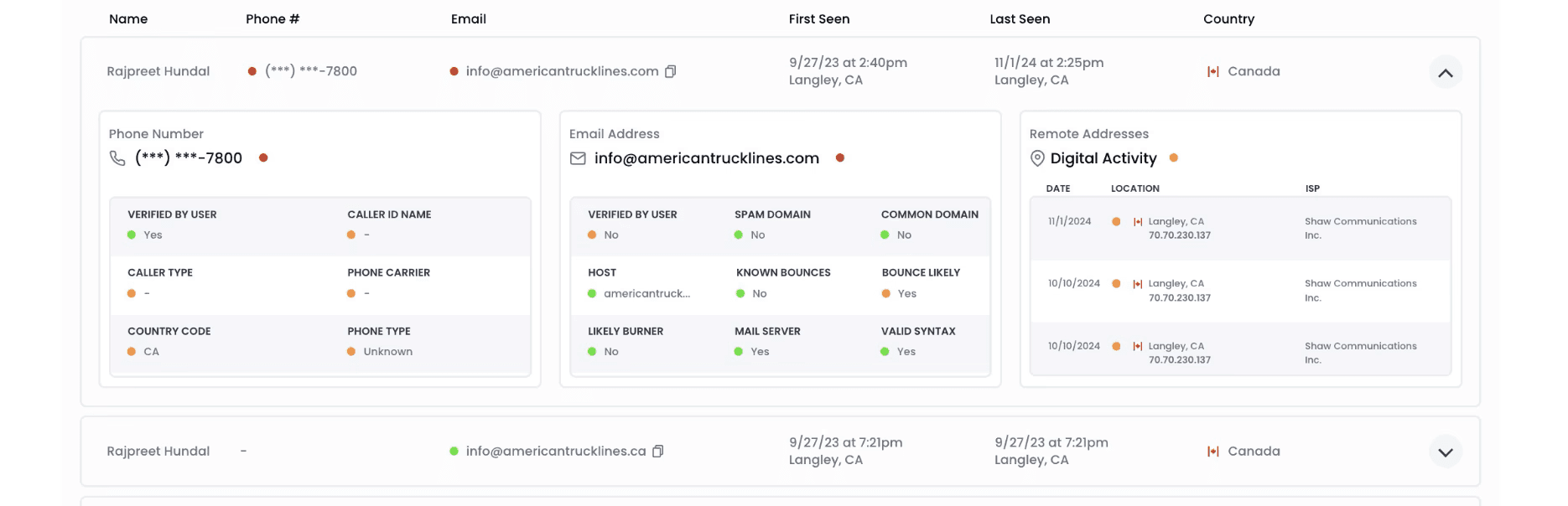
Green meant "good" in some fields and
"no problem" in others. Brokers stopped trusting
their first read of every indicator.
Color System Working Against Itself
2
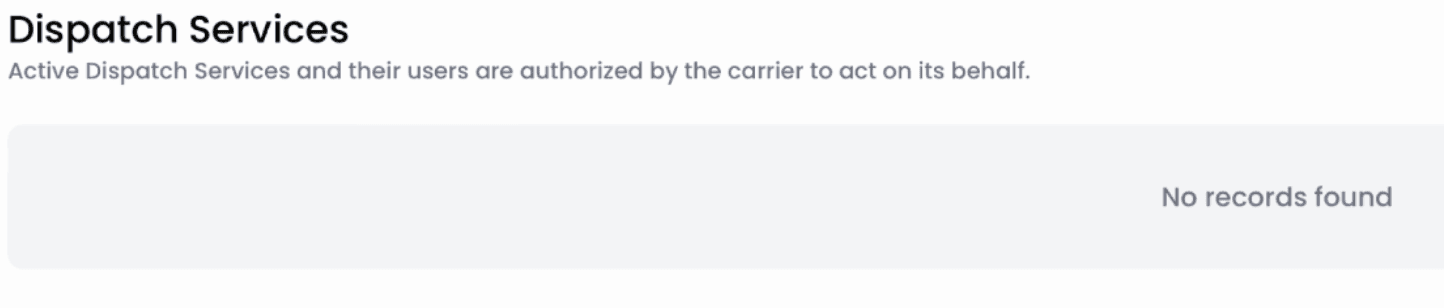
Dispatch Services appeared on every carrier
profile, almost always empty, creating confusion
about where dispatcher contacts actually live.
Sections That Existed When They Shouldn't
4
Information Architecture — Before UI
Before opening Figma, we rebuilt the data structure. What decision is a broker making at each moment? What information does that decision require, and in what order?
Signal Tiering
01
Trust & Risk Signals
Drive the go/no-go decision
02
Contact Findability
Brokers need to reach someone fast
03
Compliance & Documentation
Essential for CLs, rarely needed by CSRs
04
Supporting Metadata
Historical context, valuable but not urgent
This tiering became the skeleton for every layout and hierarchy decision that followed.
Design Decisions
01 — Progressive Disclosure
The same contact card, redesigned around who's reading it and how fast they need to move.
BEFORE - all data at equal weight
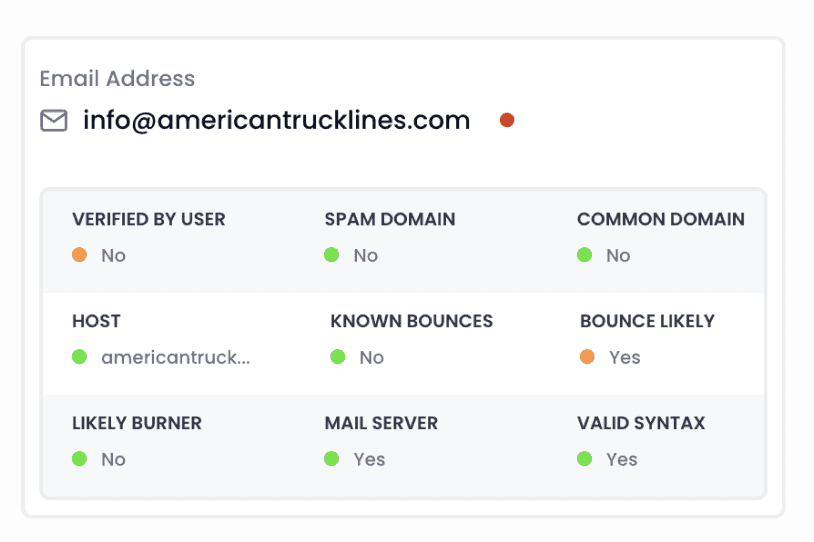
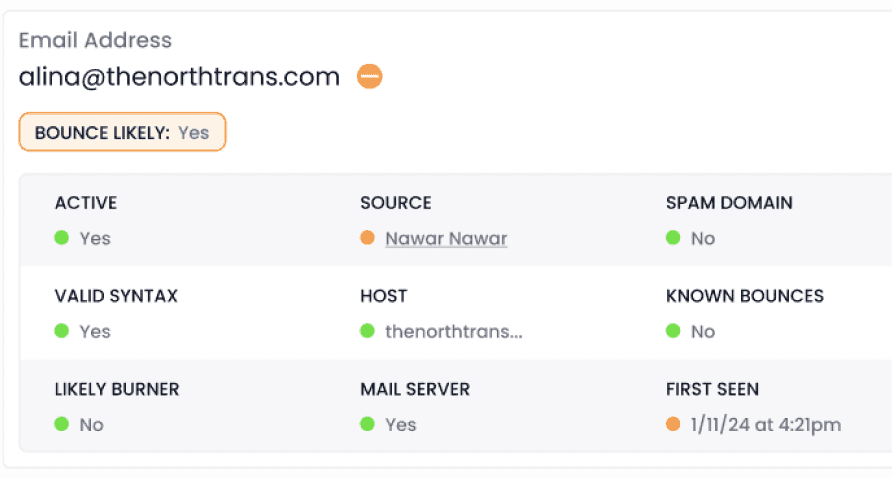
AFTER - driving indicators surfaced first
LEVEL 1 — FOR CSRS
Opens to show only driving indicators. Go / no-go
in one click. Nothing extra to read
LEVEL 2 — FOR CLS
Expands to the full data view. Only triggered when
something flags attention in Level 1.
↳ Grounded in research: CLs only expanded full dropdowns when they saw a red or orange indicator. Level 1 is
that flag. Level 2 is the explanation.
Yes/No forced color to carry opposite meanings. Green appeared on both good and bad states. Brokers stopped trusting what they saw.
02 — Indicator Language
BEFORE - green means different things
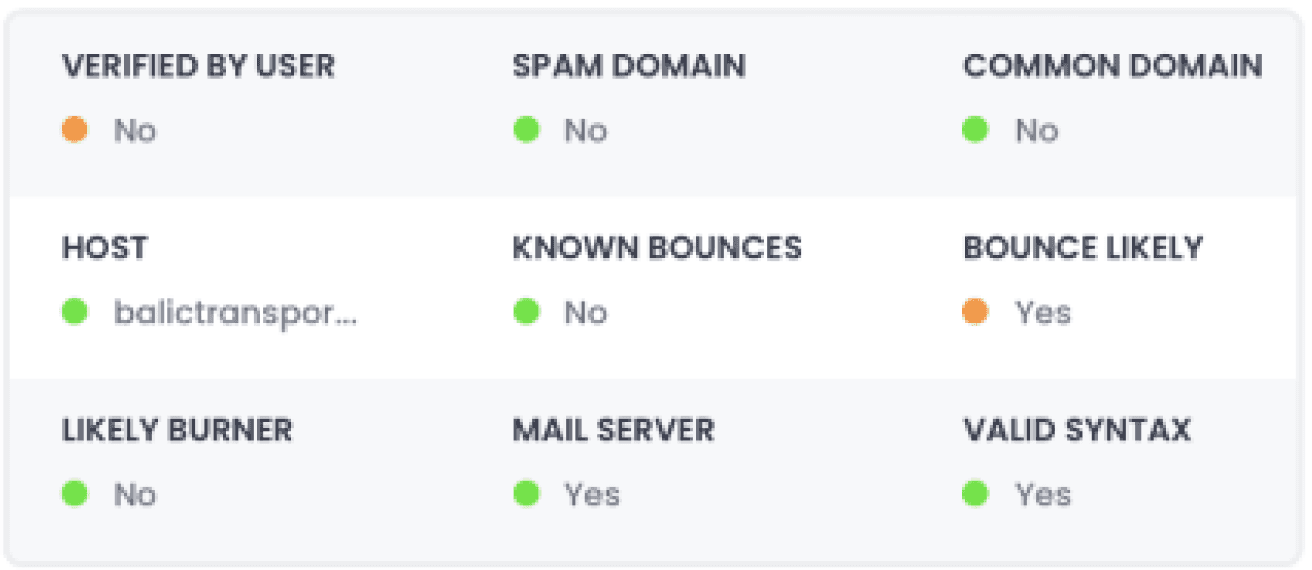
AFTER - context-specific terminology
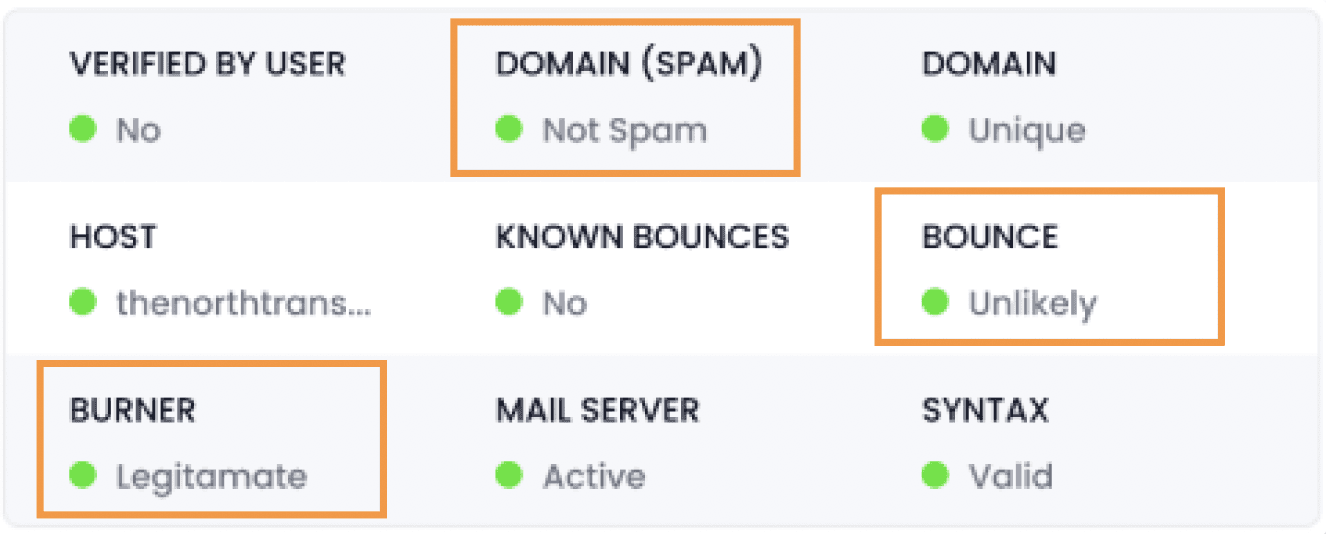
Spam Domain: Yes / No
Domain
● Safe
● Spam
Bounce Likely: Yes / No
Bounce
● Unlikely
● Likely
Mail Server: Yes / No
Mail Server
● Active
● Inactive
Valid Syntax: Yes / No
Syntax
● Valid
● Invalid
Common Domain: Yes / No
Domain
● Unique
● Common
Likely Burner: Yes / No
Burner
● Legitimate
● Possible Burner
BEFORE
● RED
● GREEN
AFTER
↳ The decision: Replace binaries with context-specific language so green always means "clean" and red always
means "look closer" — regardless of which field you're reading.
03 — Contact Architecture
Four targeted changes to make trust visible and contacts findable, without restructuring what already existed.
BEFORE - — flat list, no filters, no trust signal
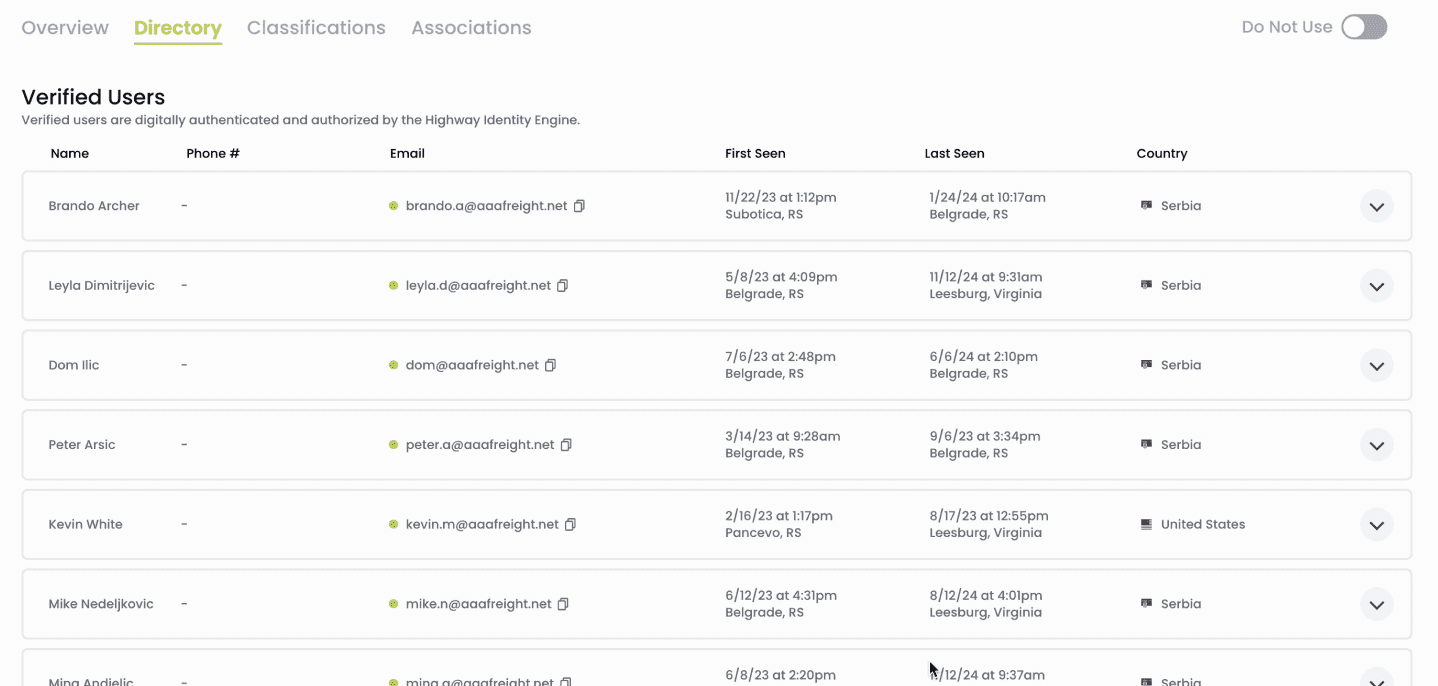
AFTER - filters, search, pagination, trust tags
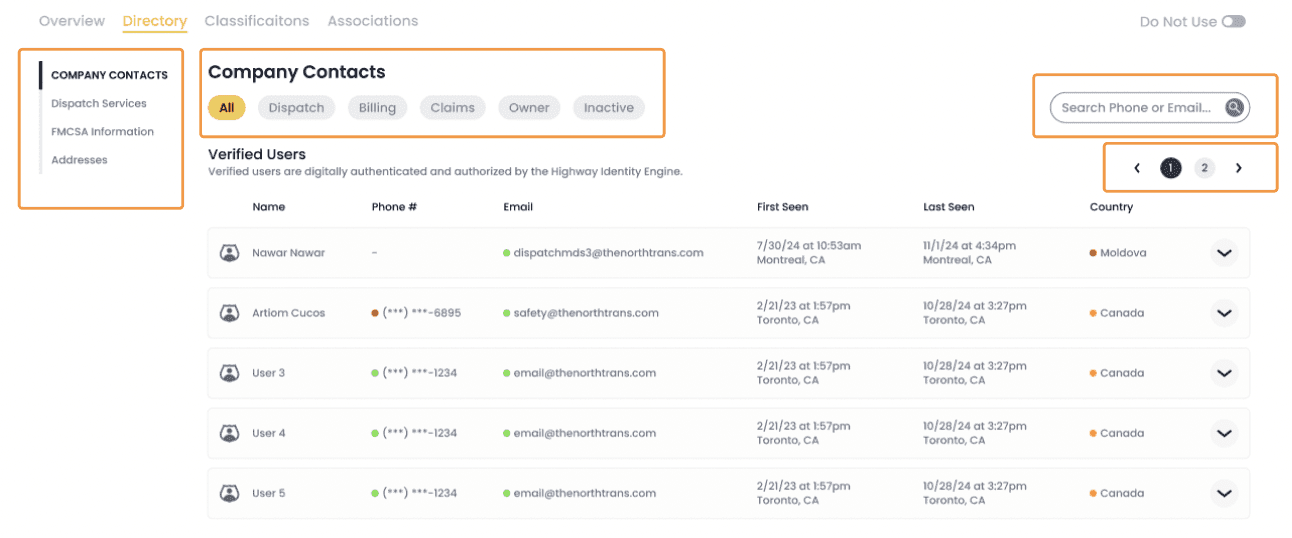
FILTER BY TAGS
Dispatch / Billing / Claims / Owner / Inactive,
filter instead of scroll.
UPLOADED BY TAGS
Shows which verified user added the contact.
Answers who vouched for this? without navigating
away.
PAGINATION
5 contacts at a time instead of all at once.
Role-based contacts no longer buried.
SEARCH WITHIN PROFILE
Brokers used CMD+F to find contacts. We gave
them that behavior as an actual feature.
↳ Grounded in research: Grounded in research: Brokers were using CMD+F to find contacts and
cross-referencing timestamps to infer credibility. Every change above was designed to replace a workaround
with a real feature.
04 — Risk Signals in the Banner
Brokers use the dispatch contact in the top banner as their first point of contact, before ever scrolling into the directory. That contact had no verification status attached to it.
BEFORE - no verification status
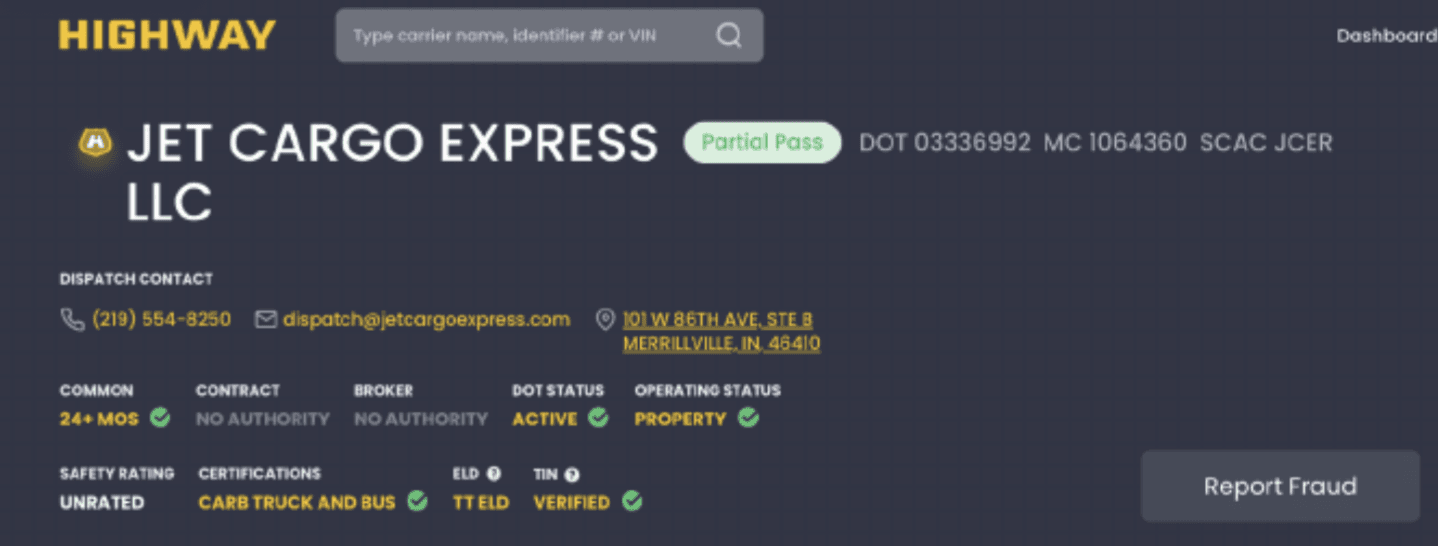
AFTER - inline risk indicators on every field
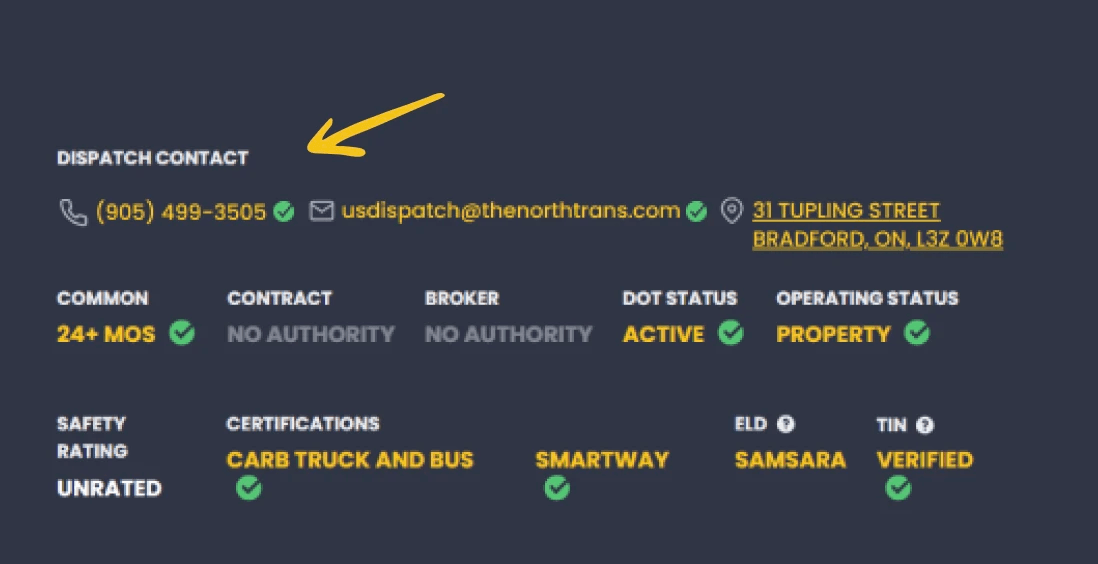
THE GAP
The banner dispatch contact was the first thing
brokers interacted with, but it had no verification
status. Brokers had to scroll deep into the directory
just to answer a question they already had.
THE FIX
Inline risk indicators added directly to the banner
contact. The first thing a broker sees now also
tells them whether to trust it, no scrolling
required.
↳ Grounded in research: Contextual inquiries showed brokers reaching for the dispatch contact in the
banner immediately, before opening any section of the directory. The banner was doing the job
of a business card but offering none of the trust signals a broker actually needed.
BEFORE - always shown,
almost always empty
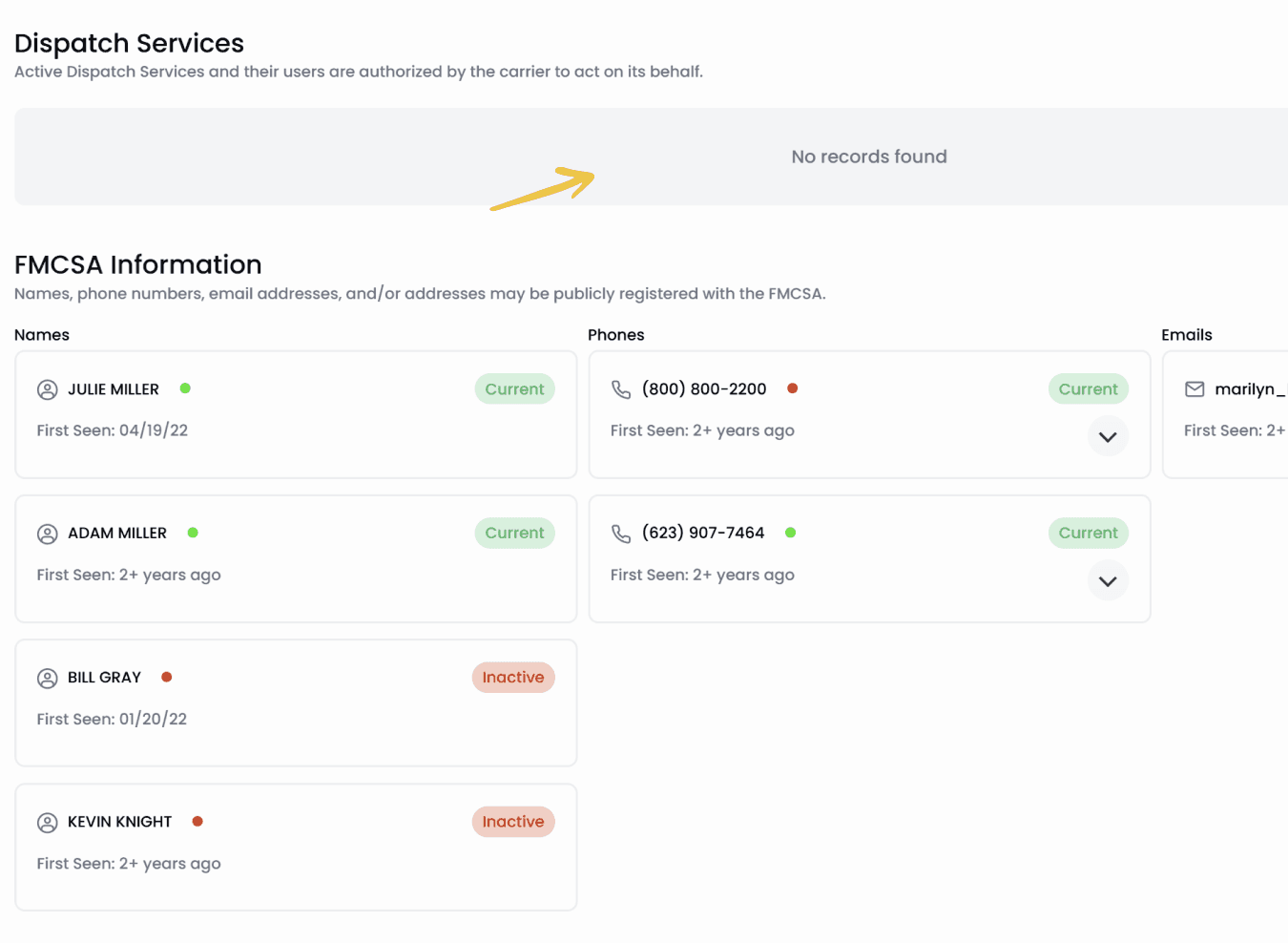
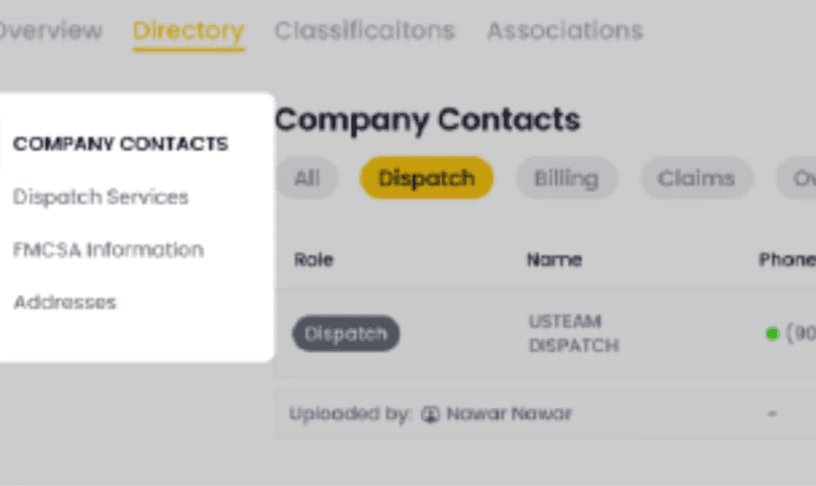
AFTER - section shown, nav includes it
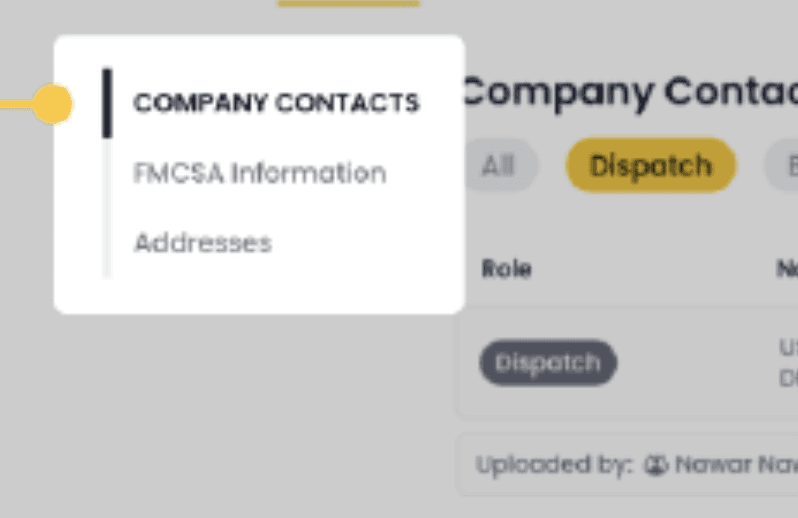
AFTER - section removed from nav entirely
05 — Conditional Dispatch Services
A section that appeared on every profile, almost always empty, was creating confusion about where dispatcher contacts actually live.
THE PROBLEM
Dispatch Services appeared in the navigation of
every carrier profile. For the vast majority of carriers
it was completely empty. "No records found", which
led brokers to wonder whether their dispatcher
contacts were simply missing.
THE FIX
Show the section only when data exists. When it
doesn't, remove it from the navigation entirely,
so the absence of a section means something,
instead of an empty section meaning nothing.
↳ Grounded in research: Brokers regularly confused Dispatch Services with the Contacts section, not
understanding why dispatcher names appeared in one but not the other. Hiding an empty section
eliminates a question that should never have existed.
Outcome
Honest assessment from usability evaluation. What landed, and what still needs work.
Evaluation Feedback
WHAT WORKED
Driving indicator placement made critical signals immediately scannable
Contact role filtering significantly reduced search time
Terminology changes made the color system trustworthy again
Conditional dispatch services removed a persistent confusion point
WHAT TO ITERATE
"Uploaded by" tag needs more visual prominence
Some role labels still unclear at a glance
Reducing clicks to access detail, brokers still want fewer steps
↳ What's next: The iteration items aren't failures, they're the next sprint. Reducing click depth and improving
Label clarity are natural second-pass problems that only surface once the first-pass structural issues are
resolved.
Lessons Learnt
Start with structure, not screens.
1
The most impactful decisions on this project happened before Figma, in the data tiering and information hierarchy. That work determined whether the UI would actually function. I now protect that phase even when there's pressure to jump to visuals.
2
"You can't remove anything" is a design constraint, not a blocker.
When I couldn't cut content, I had to develop a sharper vocabulary for sequencing it. That constraint pushed me further into hierarchy and progressive disclosure than I'd gone before.
3
Workarounds are design failures in disguise.
CMD+F to find contacts. Timestamp cross-referencing to verify credibility. Every workaround a user builds is a feature the product failed to provide. Looking for what people do around a tool rather than with it is now one of the first things I look for in research.
View Detailed Documentation